Joining composite keys with LINQ
LINQ makes working with data in its various guises easier. By intergating it into the language, we have rich integrated support for working with data. However, there are times where the syntax is slighly different from what you would typically expect with TSQL. Once case where this occurs is when trying to join two data sources that are related by more than one field (also know as a composite key). This differs from standard joins where one table has a primary key and the other table has a foreign key id. Here's a sample table structure for a standard join in Northwind between the Products and Categories:
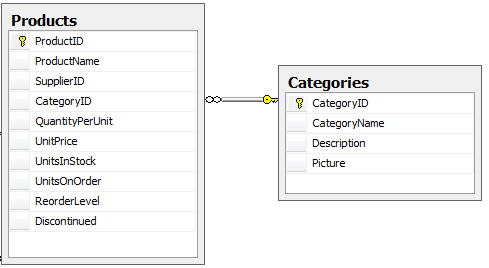
With Linq, this join could be represented with the following query:
Dim query = _
From p In dc.Products _
Join c In dc.Categories _
On p.CategoryID Equals c.CategoryID _
Select p.ProductName, c.CategoryName
So far, there's not much new in this query. Here, "p" is the outer variable and "c" is the inner variable of the join. Likewise, p.CategoryID is the outerKeySelector and c.CategoryID is the InnerKeySelector in the Join extension method.
This works fine when we have single values that can be compared easily. However, how can we specify multiple fields for the KeySelectors on the join? In my work with reverse mortgages, we have a situation where the loan amount is based in part on the lending limits set forth by HUD. In their limits, they specify the State and County for each limit. In this case, I need to join those values against the loan property's state and county to come up with the limit amount. Let's consider the following partial table schemas.
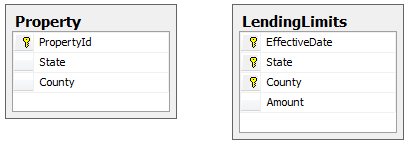
In this case, we could join the tables in TSQL with the following query:
SELECT LendingLimits.Amount
FROM LendingLimits
INNER JOIN Property
ON LendingLimits.State=Property.State AND
LendingLimits.County=Property.County
WHERE PropertyId=@SearchValue AND
EffectiveDate = @TargetDate
Unfortunately, the Join extension method does not support the ability to provide the InnerKeySelector/OuterKeySelector as a series of expressions. However, when dealing with objects, we can compare objects to see if they equal each other. Therefore, the solution in this case is to join two anonymous types and compare them against each other. Here's the corresponding LINQ query. Notice the difference in the On clause. If you understand working with objects, this syntax should make sense.
Dim query1 = _
From l In dc.LendingLimits _
Join p In dc.Properties _
On New With {l.County, l.State} Equals _
New With {p.County, p.State} _
Where p.PropertyId = SearchValue And _
l.EffectiveDate = TargetDate _
Select l.Amount