LINQ to Entity Visualizer
When demonstrating the LINQ tools, I typically start out showing the LINQ to SQL visualizer that’s available with the C# Samples. Today I saw that Raja Venkatesh has released a Visualizer for ObjectQuery<T> (aka. LINQ to Entities). As you do with the other visualizers, you enable this by simply saving the AnySourceEntityQueryVisualizer.dll to your Visualizers directory. )Note: :the download page specifies to copy it to your C:\Program Files (x86)\Microsoft Visual Studio 9.0\Common7\Packages\Debugger\Visualizers. However, Windows 7 blocks saving files there by default. Alternatively, you can copy it to your My Documents\Visual Studio 2008\Visualizers.
Once you install it, put a breakpoint after your query is declared. If you hover over the query variable, you should see the magnifying glass indicating the debugger visualizer:

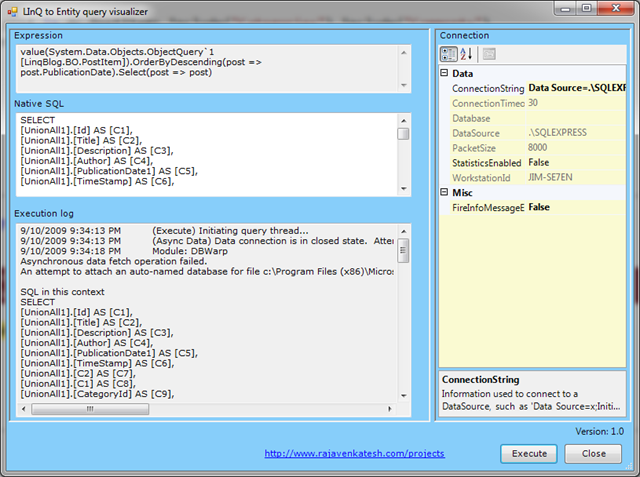
Clicking on the magnifying glass brings you to a screen that shows the Expression, projected SQL, and Connection properties. If you click “Execute”, you will see the server log and a grid with the results.
If you want to try it out, feel free to download it from the Visual Studio Gallery page for the LINQ to Entity Visualizer. I’ll be adding a linq to this on my LINQ Tool list as well.


Thank you for talking about my Linq to Entity visualiser. I appreciate your work as you have written here.
It would help me and most of the people if you could mention with which database you used. I've tried to keep it working for most of the databases.
Thanks
RV
Raja Venkatesh (Posted on 9/11/2009 1:31:00 PM)
Jim (Posted on 9/12/2009 1:41:00 PM)
While you use it next time you may try this while your edmx connects to Oracle, DB2, MySQL, Access, etc along with MS SQL. To verify your connection strings and native SQL you may try my other tool "Datatool-simple" which could be quite handy while able to connect to any database. Of course it requires the appropriate providers installed in your PC.
If you could discover the main interesting and distingushing feature of the tool which is to connect to almost any database it would be great.
Sorry for disturbing your time.
Good Luck.
RV
Raja Venkatesh (Posted on 9/13/2009 1:29:00 PM)
edwin (Posted on 9/14/2009 3:59:00 AM)
Tried to install it on my machine, Win7, and VS2010, dropped it in both the Documents and the Program Files directory and it just won't show up the magnifying glass. I've also done the right click/properties/unblock and still no luck...
So not sure what else I could try.... but i like the concept.
NoLuck (Posted on 6/15/2010 11:52:00 AM)
Great Work.
Thanks,
Ketan Jetty (Posted on 7/9/2010 3:09:00 PM)
For users of Linq to Entity Visualizer who could not get it working, kindly see the Q & A section at "http://visualstudiogallery.msdn.microsoft.com/en-us/99468ece-689b-481c-868c-19e00e0a4e69". I've put few suggestions to get it working in VS2008 and VS2010.
You may post your comments at www.visualstudiogallery.com where you downloaded or email me at rrvenki@yahoo.com.
Thanks
Venkat
Raja Venkatesh (Posted on 8/18/2010 11:32:00 AM)